Note
Go to the end to download the full example code.
Control flow in WorkGraph
Introduction
In this guide, we demonstrate how to define control flow constructs (e.g., if, for, while) in WorkGraph using native Python control flow statements.
We emphasize throughout this guide that control flow constructs are tasks in their own right.
By treating them as such, we can leverage native Python to schedule tasks dynamically.
Let’s have a look at how to handle conditional and iterative logic in WorkGraph.
if/elif/else logic
To handle conditional logic in WorkGraph, we must queue it as a dynamic task.
For this, we need to encapsulate the control flow logic using @task.graph.
from aiida_workgraph import task
from aiida import load_profile


load_profile()


@task
def add(x, y):
    return x + y


@task
def multiply(x, y):
    return x * y


@task.graph
def ConditionalArithmetic(n, x, y):
    return add(x, y).result if n < 5 else multiply(x, y).result
The ConditionalArithmetic task determines the task flow dynamically depending on the value of n.
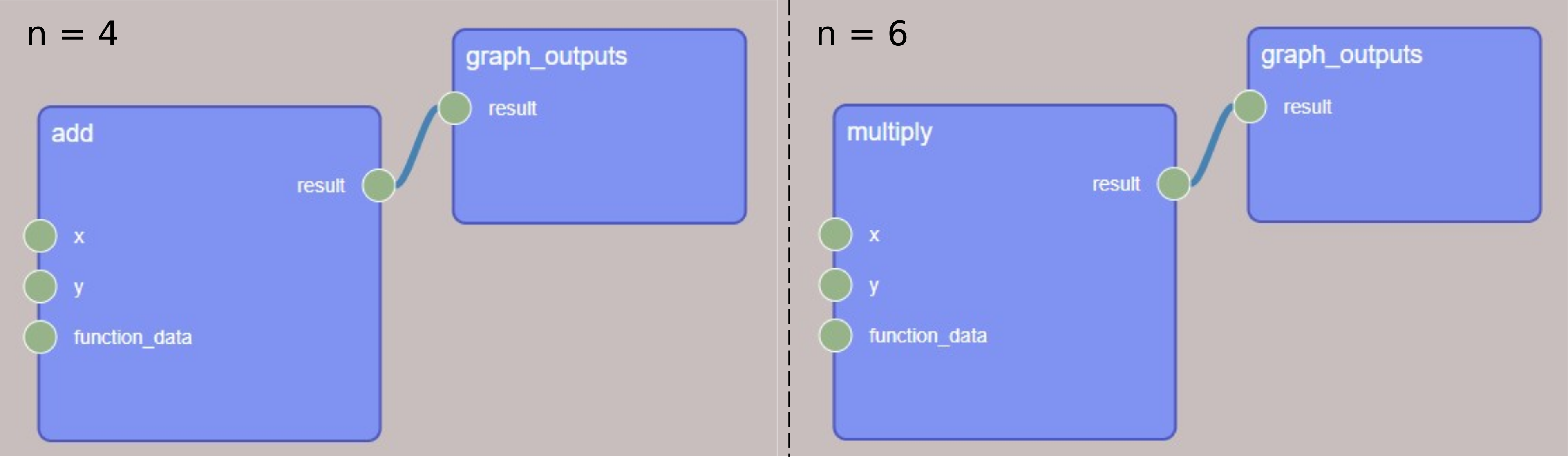
The two possible branches of the ConditionalArithmetic task
Important
To preserve the provenance, it is strongly advised to only use inputs in evaluating the conditional, e.g., n < 5, where n is an input.
This follows a core principle of AiiDA where workflow processes (e.g., WorkGraph) should not create data, only return it.
As you can see in our example above, the ConditionalArithmetic graph task (WorkGraph in the background) does not create any data, but only returns the result of the addition or multiplication (calculation) tasks.
The above can be applied to wrap any conditional logic built on if, elif, and else statements.
for loop
The same approach is taken to model for loops:
@task.graph
def ForLoop(n, m):
    for _ in range(n):
        m = add(x=m, y=1).result
    return m


ForLoop.build(n=4, m=0)
Important
Again, note that we are not creating any data in the graph task, but only returning the repeated result of the addition tasks.
while loop
The case of while takes a bit more care.
This is because the termination must be defined w.r.t an input (according to the aforementioned AiiDA principle).
However, while loops tend to define a condition that is updated during the loop.
Consider the following example:
@task.graph
def WhileLoop(n, m):
    while m < n:
        m = add(x=m, y=1).result
    return m
If you try to build this graph with inputs n and a smaller m, you will get an infinite loop.
This is because the while loop condition is determined by the input value m.
The body task is not actually updating m.
To solve this problem, we can cast our while loop as a recursive operation:
@task.graph
def WhileLoop(n, m):
    if m >= n:
        return m
    m = add(x=m, y=1).result
    return WhileLoop(n=n, m=m)


wg = WhileLoop.build(n=4, m=0)

wg
At each iteration, the m result socket of the add task is passed as an input to the next WhileLoop task and is received by it as a value, not a socket.
This allows the correct evaluation of the termination condition, thus avoiding the infinite loop.
Tip
If you are using the AiiDA GUI, you can visualize each recursive layer by following down the WhileLoop tasks.
Run the graph:
wg.run()
print(wg.outputs.result.value)
uuid: 46f9877a-03f1-4bfd-8344-394f86173afd (pk: 183) value: 4
Limiting recursion with max_depth
Recursive graphs have a built-in safeguard: a maximum recursion depth. By default this is
100 nested calls. If the limit is reached, the engine reports a message and raises
RecursionError. Deep recursion is generally discouraged—prefer batching the iteration
inside a single task where feasible.
You can raise the limit if you know your workflow needs more layers:
@task.graph(max_depth=200)
def WhileLoop(n, m):
    ...
You can also lower it deliberately to cap the maximum number of iterations. This is a practical safety brake against runaway or unexpectedly long recursions:
Note
The reported “call depth” is an approximation based on the AiiDA process tree, not the exact same call depth as the recursive call.
Summary
Controlling the dynamic flow of tasks in WorkGraph is simple and intuitive, leveraging on the overall principle of queuing tasks. In this guide, you learned how to use the @task.graph decorator to:
define conditional logic using
if/elif/elsestatementsdefine iterative logic of pre-determined length using
forloopsdefine iterative logic of dynamic length using
whileloops via recursion
Total running time of the script: (0 minutes 4.763 seconds)