Overview
Flexible workflow construction
AiiDA-WorkGraph supports three complementary approaches to building workflows, whether you prefer writing clean Python code, visualizing complex logic, or exercising low-level control. This flexibility lets you choose the method that best fits your project and working style.
1. Pythonic workflows
Define entire workflows using standard Python functions and intuitive decorators. This approach is ideal for developers who prefer expressing logic directly in code, enabling rapid prototyping, automation, and easy integration into larger Python applications.
from aiida_workgraph import task

# Define individual tasks with the @task decorator
@task
def add(x, y):
    return x + y

@task
def multiply(x, y):
    return x * y

# Compose tasks into a workflow using the @task.graph decorator
@task.graph()
def add_multiply(x, y, z):
    if x > 0:
        return add(x, y).result
    else:
        return multiply(x, y).result

# Run the workflow
add_multiply.run(x=2, y=3, z=4)
2. Visual graph with explicit logic
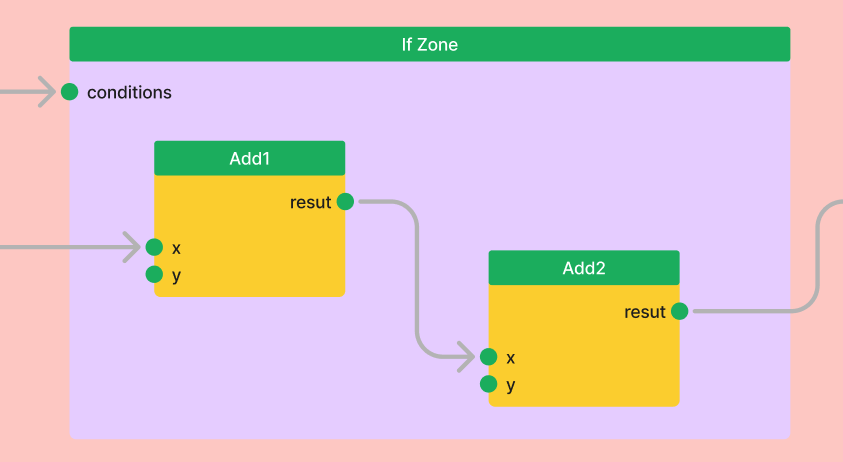
For those who prefer to visualize control flow, AiiDA-WorkGraph offers zone-based construction. Use explicit zones like If, While, and Map to build a graph that clearly shows the workflow’s structure and dependencies. This avoids hiding logic inside “black-box” Python functions and makes complex workflows easier to understand.
from aiida_workgraph import If

with If(x > 0) as if_zone:
    add1 = add(x=x, y=y).result
    add2 = add(x=add1, y=z).result
3. Low-Level node-graph programming
For maximum control, you can construct a workflow by programmatically defining each task and connecting their inputs and outputs (links). While more verbose, this method is invaluable for advanced use cases, such as programmatically generating a graph’s structure. See: Node-graph programming
from aiida_workgraph import WorkGraph

wg = WorkGraph("test_add_multiply")
wg.add_task(add, name="add1")
wg.add_task(multiply, name="multiply1")
wg.add_link(wg.tasks.add1.outputs.result, wg.tasks.multiply1.inputs.x)
Key features
Powerful execution capabilities
Remote execution: Seamlessly offload tasks to remote supercomputers. AiiDA-WorkGraph handles the details of connecting and running shell commands or Python functions on any configured machine.
from aiida_workgraph import shelljob

remote_computer = orm.load_computer("remote_computer_label")

outputs = shelljob(
    command="date", # The command to execute
    metadata={"computer": remote_computer},
)
Parallel tasks: Effortlessly launch and manage multiple tasks in parallel without writing complex concurrency code. AiiDA-WorkGraph handles the scheduling and data collection.
@task.graph()
def parallel_add(x, N):
    results = {}
    # Launch N parallel tasks to add x with each index
    for i in range(N):
        results[f"add_{i}"] = add(x, i).result
    return results
High-throughput computing: Built to scale, AiiDA-WorkGraph can efficiently manage thousands of concurrent workflows, making it ideal for large-scale screening studies and data-intensive computations.
Robustness and reproducibility
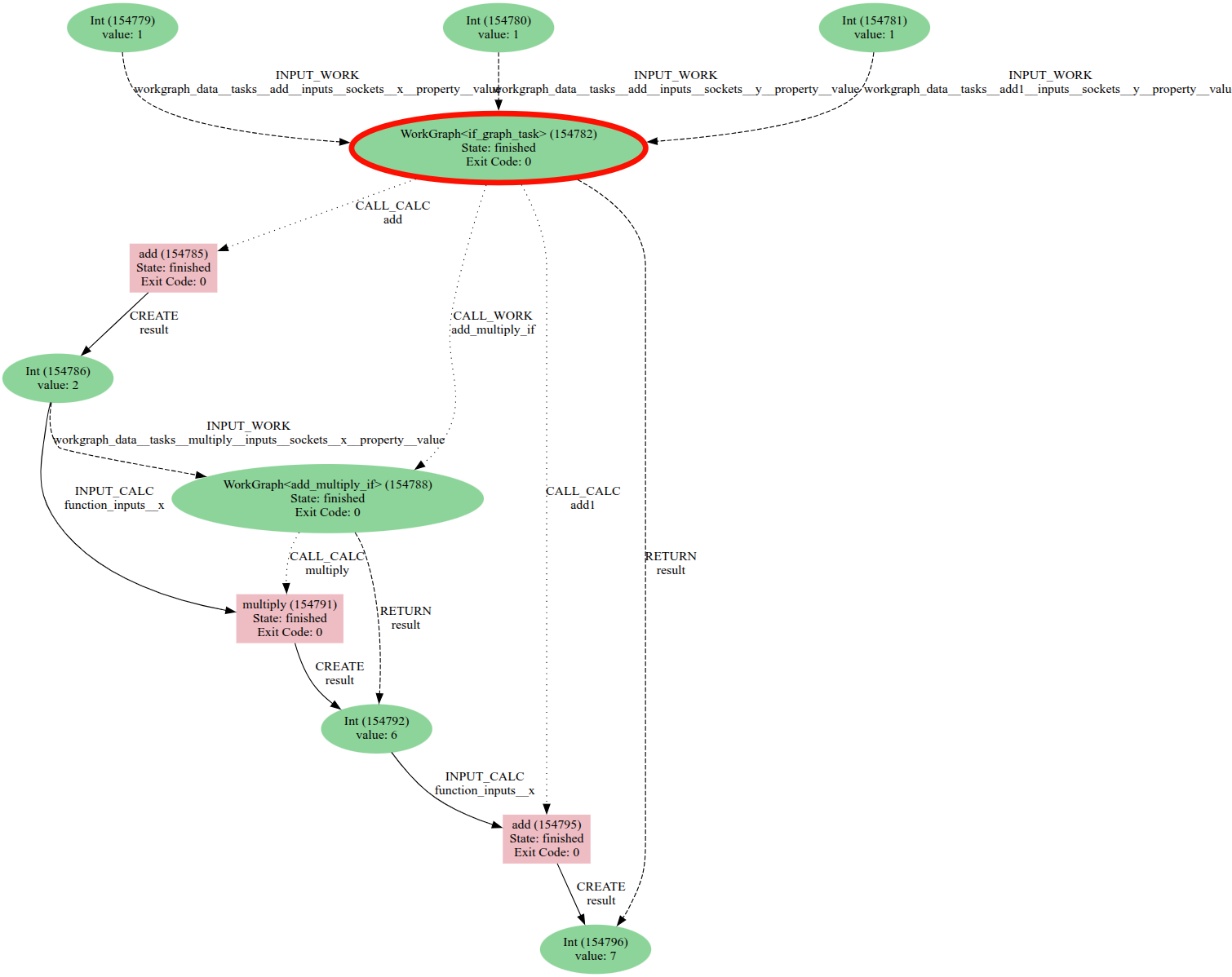
Automatic provenance: Guarantee scientific reproducibility with zero effort. AiiDA-WorkGraph automatically tracks the complete history of all data and calculations, creating a detailed provenance graph that ensures full traceability.
Checkpointing: Protect long-running workflows from interruptions. AiiDA-WorkGraph can save a workflow’s state at any point and resume execution from the last checkpoint, saving valuable time and computational resources.
Advanced error handling: Build resilient workflows that can recover from failures. Define custom handlers to respond to specific exit codes, allowing your workflow to retry a failed task, branch to a cleanup routine, or exit gracefully.
The example below shows a workflow recovering from an initial task failure (exit code 410) and completing successfully.
WorkGraph<handling_error_negative_number><968> Finished [0]
    ├── ArithmeticAddCalculation<971> Finished [410]
    └── ArithmeticAddCalculation<977> Finished [0]
Advanced control and modularity
Dynamic workflow: Build adaptive workflows that respond to data at runtime. Use standard Python
if/elsestatements,whileloops (via recursion), and other control structures to dynamically alter the execution path.# 'if' condition example @task.graph() def conditional_workflow(x): if x > 0: return add(x, 10).result else: return multiply(x, 10).result
Reusable workflows: Don’t reinvent the wheel. Encapsulate common routines as sub-workflows and easily reuse them in larger, more complex pipelines to build modular and maintainable solutions.
@task.graph()
def main_workflow(x, y):
    sum1 = add(x, y).result
    # Call the reusable add_multiply workflow
    result1 = add_multiply(sum1, 2, 3).result
    return result1
Event-driven execution: Trigger tasks based on external events for truly adaptive workflows. Monitor for conditions like the arrival of a file or a specific time, enabling integration with real-time data streams or experimental facilities.
@task.monitor
def time_monitor(time):
    """This task waits until a specified time has passed."""
    import datetime
    return datetime.datetime.now() > time.value
Intuitive user experience
Interactive GUI: Visualize, monitor, and debug your workflows in real-time with a user-friendly web interface. Inspect the graph, check task statuses, and dive into the details of any calculation.

What’s Next?
Explore the following resources to begin your journey with AiiDA-WorkGraph:
Get up and running with a simple workflow example. |
|
Learn the core concepts behind AiiDA-WorkGraph. |
|
Discover real-world examples in computational materials science and other domains. |
|
Master advanced topics like control flow with
|
|
Use the web UI to explore WorkGraphs |